The Digital Fitness Trainer for Your Pocket
The Digital Fitness Trainer for Your Pocket #
Author: Ruwen Frick — Master’s Project 2025
Motivation: Why I Built FitAI Pro #
Strength training has consistently been proven to offer a wide range of health benefits. But there’s a catch: form matters. Incorrect form not only limits progress but can also lead to serious injuries. Obtaining qualified feedback on the execution of exercises is paramount for ensuring a safe and effective training style.
Traditionally, this feedback comes from personal trainers. While usually very effective, this form of feedback is expensive, time-limited, and inflexible.
That’s where FitAI Pro comes in. The goal: bring real-time movement feedback to every athlete’s pocket, using advanced computer vision models and self-developed algorithms.
Introducing FitAI Pro #
FitAI Pro is a digital personal trainer in the form of an app for your phone or tablet. It uses your smartphone’s camera to analyze exercises and provide feedback on form, repetitions, and common mistakes with no additional sensors or wearables required.
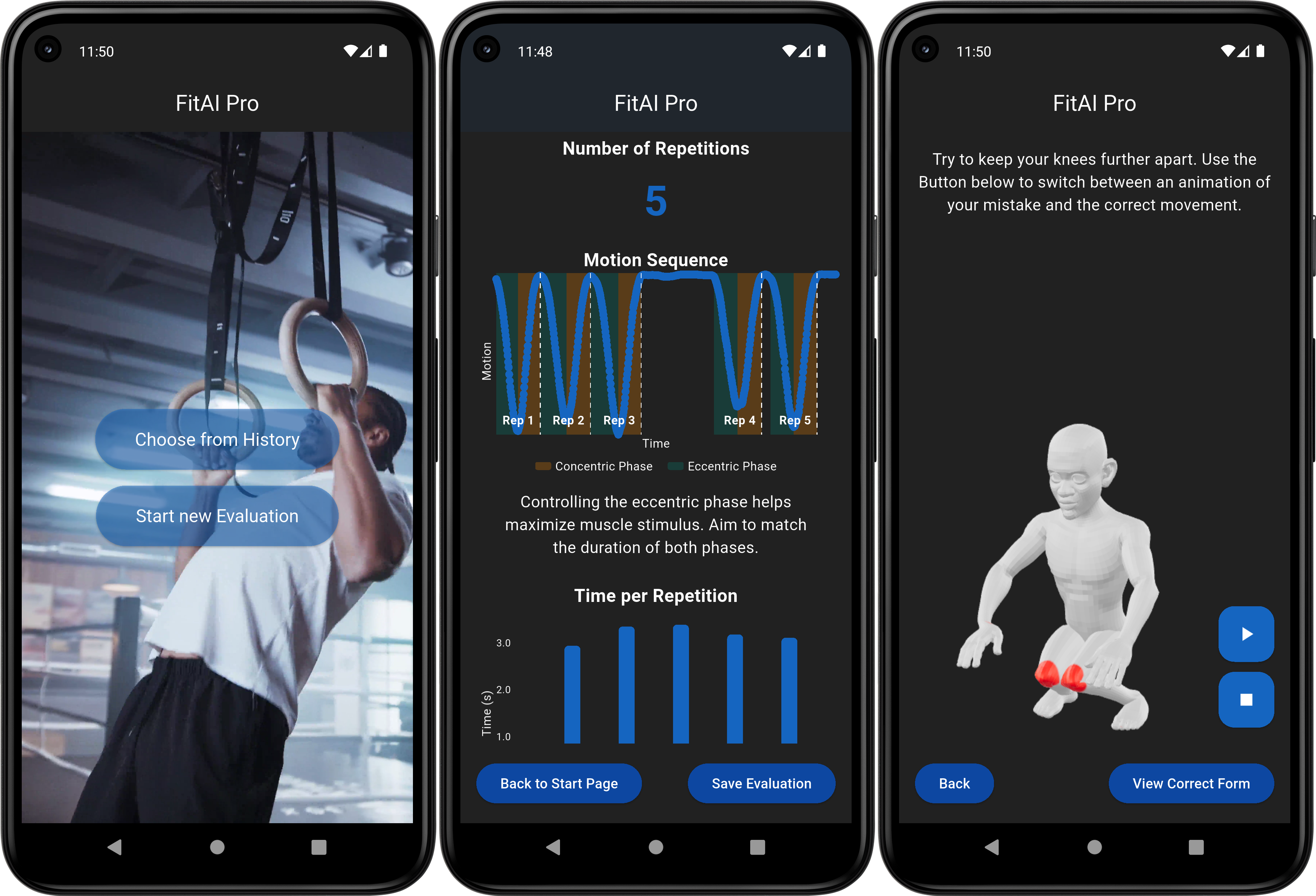 Screenshots of the FitAI Pro App
How It Works #
1. Human Pose Estimation (HPE) #
At the heart of FitAI Pro lies Human Pose Estimation (HPE) - a computer vision technique that attempts to identify anatomical key points of humans (like shoulders, elbow or knees) in video frames. For this task, I have chosen a convolutional neural network developed by Google called BlazePose. It offers easy implementation, high accuracy and robust inference speeds.
2. Exercise Recognition #
FitAI Pro also attempts to determine the exercise being performed by the user.
For this, I have fine-tuned an Inception-based neural network using a self-created set of training videos and labels. The model training worked very smoothly and the model achieves >0.85 accuracy on the validation set after training.
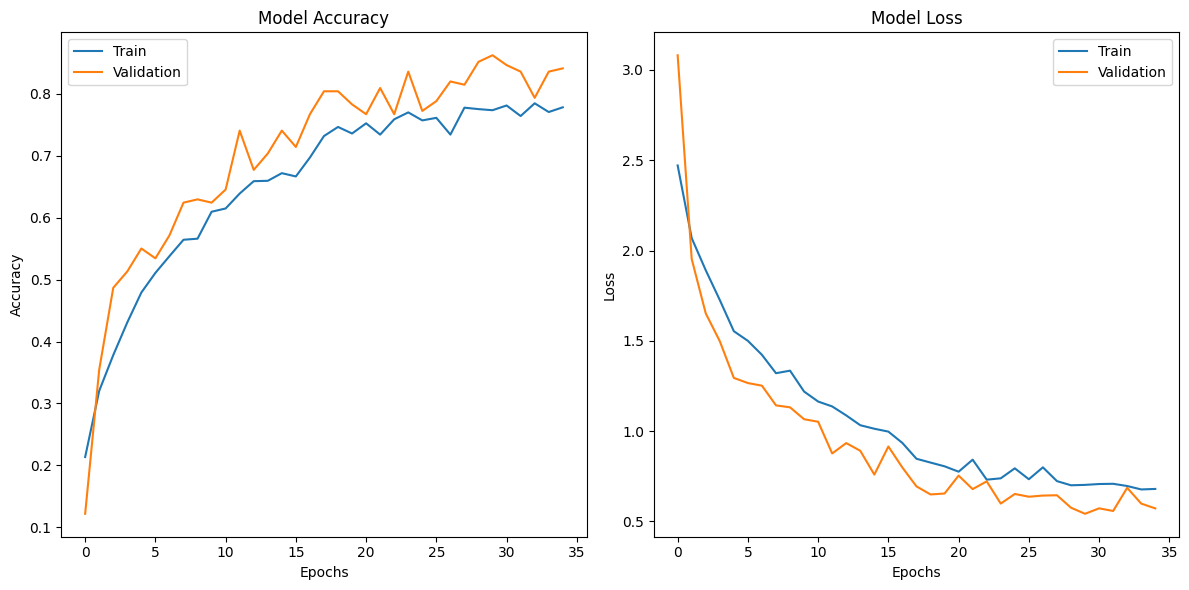
Training and validation accuracy and loss over epochs for exercise classification model
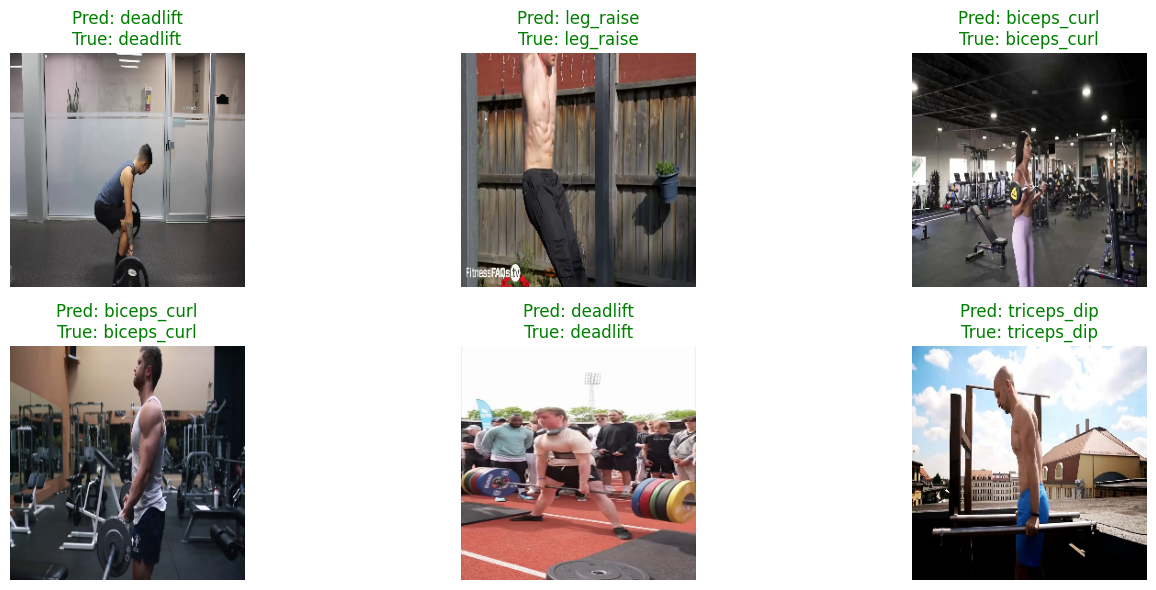
Sample of validation set images with predicted (Pred) and true classes for exercise classification model
3. Error Detection #
The main feature of FitAI Pro is its automated, exercise-specific error detection capability.
Across 10 core exercises, the system detects 15 different common form errors. These errors are computed independent of body type or anatomy by analyzing either angles formed by joints or distances of keypoints relative to the user’s proportions.
Some examples of form errors detected by FitAI Pro:
Arms swinging #
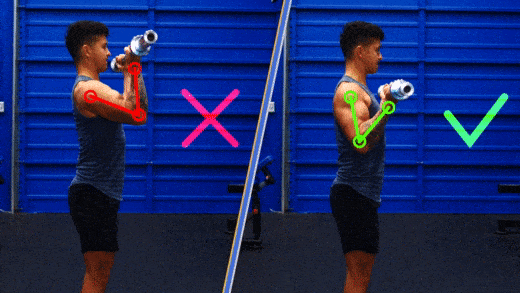
The arms swinging error is relevant for the biceps curl and triceps pushdown exercises. If the angle formed by the hip, the shoulder and elbow exceeds 40 degrees at any time during the execution, the arms swinging error is detected. Letting the arms swing reduces the load on the target muscle.
Hips before shoulders #
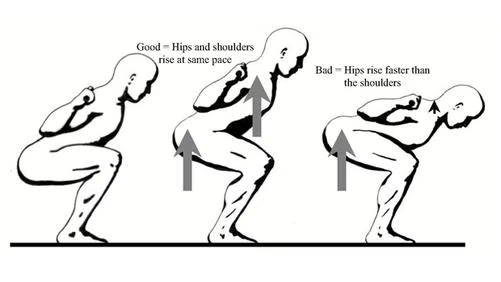
When performing a squat, raising the hips before the shoulders is a common error, especially among beginners. This movement pattern effectively turns the squat into a different exercise known as the good morning, which shifts the emphasis away from the quadriceps and glutes and places it on the lower back. Detecting this error involves measuring the distances between the hips and ankles as well as the shoulders and ankles. These two distances are then subtracted from one another, giving the difference in distance to the ankles for the hips and shoulders.
When performing the squat optimally, this distance stays consistently large for the complete repetition. Allowing this distance to fall below half the torso length indicates a position in which the torso is almost parallel to the floor (as seen in the rightmost image the figure below). Should this position be reached, the hips before shoulders error is detected.
4. Meta Information Extraction #
Besides exercise-specific potential errors, FitAI Pro can also detect some meta information for every exercise. These are:
- Number of Repetitions
- Movement phases: concentric (lifting), eccentric (lowering), and rest as well as durations
For both these metrics, the self-similarity matrix of the keypoint positions for all video frames forms the basis. This matrix is created by calculating the cosine similarity of all keypoint coordinates for every frame with every other frame (as seen on the left in the figure below). By extracting the first row (or column) of this matrix and then smoothing it, a movement signal is created (right in the figure below). This signal shows how similar the users position in one frame is compared to the first frame in the video, the starting position of the exercise. As strength training exercises always consist of deviating and then returning to the starting position, this signal is periodic in nature. By finding the peaks in this signal, the repetions can be segmented and counted.
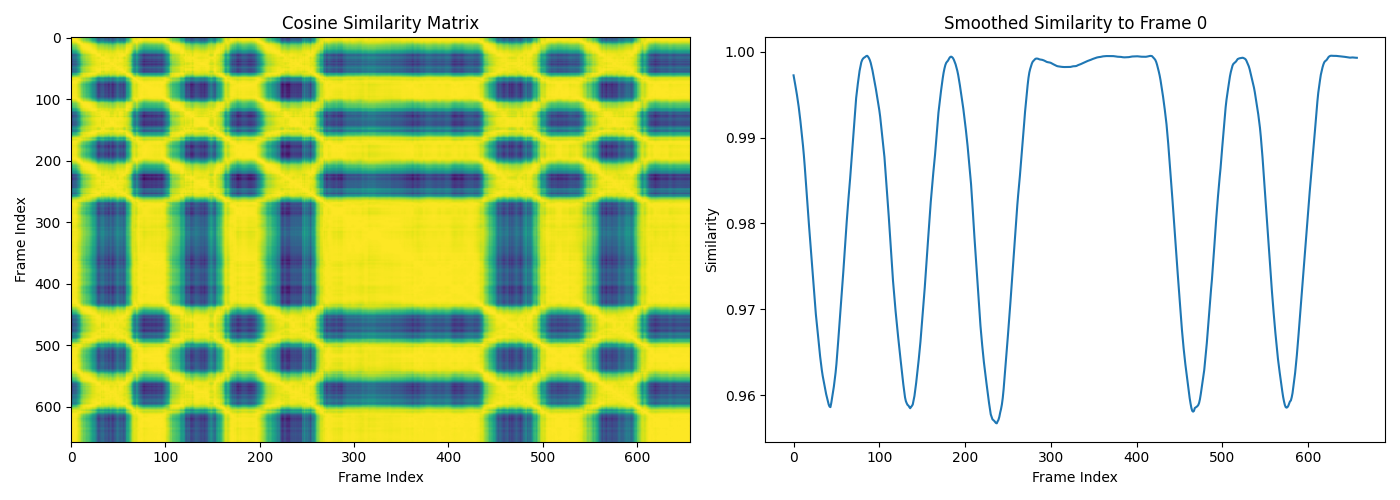
For segmenting these executions into movement phases, the signal is inverted (by multiplying with -1), and peak detection is performed again. These inverted peaks segment the movement further into eccentric and concentric phases, while phases of little deviation, as measured by the first derivative of the similarity signal, are labeled as rest phases.
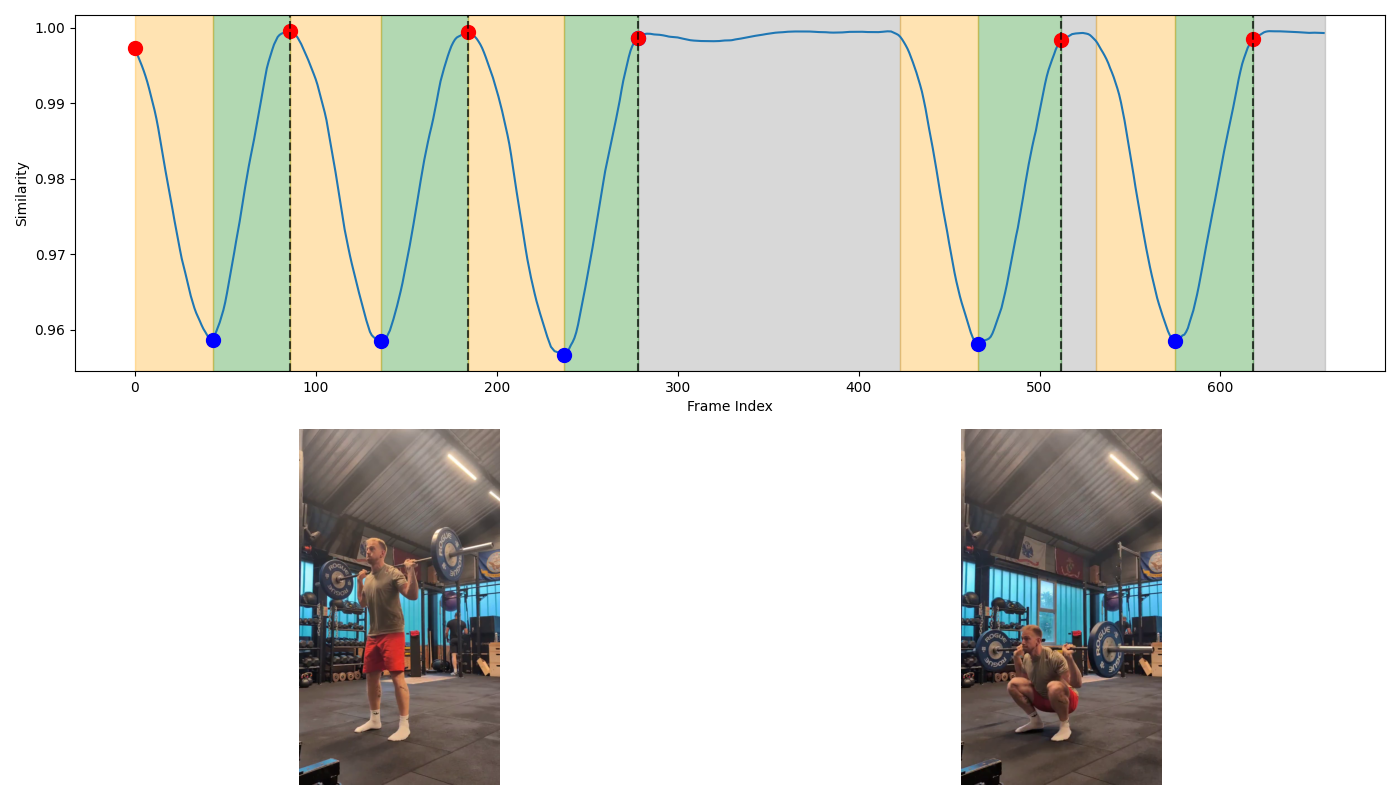 Top: Similarity signal with annotated movement phases, repetition peaks, and turning points. Orange areas indicate eccentric phases, green indicate concentric phases, and grey indicate rest phases. Red points mark repetition peaks, and blue points mark turning points. Dashed vertical lines mark completed repetitions.
Bottom: Frame in the example video corresponding to the first repetition peak (left) and the first turning point (right).
Top: Similarity signal with annotated movement phases, repetition peaks, and turning points. Orange areas indicate eccentric phases, green indicate concentric phases, and grey indicate rest phases. Red points mark repetition peaks, and blue points mark turning points. Dashed vertical lines mark completed repetitions.
Bottom: Frame in the example video corresponding to the first repetition peak (left) and the first turning point (right).
Expert Feedback #
For external validation, I have shown the FitAI Pro app to some experts in the field of strength training. Their feedback was generally very positive:
-
“FitAI Pro is an extremely relevant and useful concept, especially for beginners.” Manuel Brogle, Trainer A-Lizenz, Athletenhalle Vaduz
-
“We love how little equipment is needed for accurate evaluation.”
Pascal & Rebecca Balmer, Dipl. Fitnesstrainer, Puls Athletik Sennwald
Limitations and Next Steps #
To improve the usability of the app and develop it further towards a market ready application, further research and development is needed.
Some possible areas of improvement:
- Improve robustness of pose estimation (e.g., by adding stereo cameras)
- Expand exercise and error library
- Enhance user experience and interface
Download on Google Play #
FitAI Pro is available in the Play Store. You can download it here and try for yourself. Please keep in mind that it is not a finished product, so some bugs are almost bound to happen.